Messaging Administrator Resume
Messaging Administrator Resume:
In today's digital landscape, the role of a Messaging Administrator is pivotal in ensuring seamless communication across platforms. A well-crafted resume not only showcases your technical skills but also highlights your ability to manage and optimize messaging systems effectively. A strong resume can be the differentiating factor in a competitive job market, capturing the attention of potential employers and demonstrating your expertise and commitment to excellence.
Crafting a targeted resume tailored to the Messaging Administrator role is essential for standing out. It allows you to present your relevant experience, achievements, and professional growth in a clear and engaging manner. A compelling resume conveys your understanding of messaging systems, security protocols, and user support, making it easier for hiring managers to envision you as a valuable addition to their team.
Looking for more roles in the Administrative field? Explore our comprehensive Administrative Job Roles / Professions for additional resume guides and examples.
About Messaging Administrator
How to Write a Messaging Administrator Resume
Creating a standout resume for a Messaging Administrator position involves strategic planning and clear presentation. Focus on showcasing your technical expertise and relevant experience. Here’s a step-by-step guide to help you craft an impressive resume.
- Tailor Your Resume
- Research the specific requirements of the job posting.
- Highlight relevant skills and experiences that align with the job description.
- Use a Professional Format
- Choose a clean, easy-to-read layout with consistent fonts.
- Ensure proper alignment and spacing for better readability.
- Craft a Compelling Summary
- Write a brief statement summarizing your expertise and career goals.
- Focus on your unique qualifications as they relate to messaging systems.
- Detail Your Work Experience
- List your work history in reverse chronological order.
- Include job titles, company names, and dates of employment.
- Use bullet points to describe your responsibilities and achievements.
- Highlight Your Skills
- Create a dedicated section for key skills relevant to messaging systems.
- Include both technical skills and soft skills that support your role.
- Include Education and Certifications
- Mention your educational background, including degrees and relevant certifications.
- Highlight any specific training related to messaging technologies.
Best Resume Format for Messaging Administrator
The recommended resume format for a Messaging Administrator typically varies based on your experience level. The most effective formats include chronological, functional, and hybrid.
Chronological resumes are ideal for those with a solid work history in the field, showcasing progression and stability. Functional resumes focus on skills and competencies, which can be beneficial for career changers or those with gaps in employment. Hybrid resumes combine elements of both formats, providing a comprehensive overview of skills while still detailing work history.
Key features of each format include:
- Chronological: Highlights employment history, emphasizes job titles and accomplishments.
- Functional: Showcases skills at the forefront, minimizes the importance of dates.
- Hybrid: Balances skills and work experience, offering flexibility to present strengths.
Messaging Administrator Resume Summary Examples
1. Intern: Recent graduate with a degree in Information Technology, eager to gain hands-on experience as a Messaging Administrator. Proficient in Microsoft Exchange and Outlook, with a strong foundation in network protocols and troubleshooting.
2. Entry Level: Detail-oriented individual with foundational knowledge of messaging systems and user support. Demonstrated ability to configure email accounts and assist users in resolving technical issues, seeking to leverage skills as a Messaging Administrator.
3. Mid Level: Experienced Messaging Administrator with over three years of hands-on experience managing email systems and user accounts. Proven track record in optimizing messaging platforms and enhancing security protocols, looking to bring expertise to a dynamic team.
4. Senior Level: Senior Messaging Administrator with over seven years in the field, specializing in large-scale implementations and migrations. Recognized for driving efficiency and security in messaging environments, aiming to lead innovative projects.
5. Expert Level: Accomplished Messaging Administrator with a decade of experience in enterprise-level messaging solutions. Expert in integrating advanced messaging systems and training teams on best practices, seeking to contribute strategic insights to a forward-thinking organization.
Messaging Administrator Resume Objective Examples
1. Seeking an internship position as a Messaging Administrator to apply my knowledge of IT principles and eagerness to learn in a real-world environment.
2. Entry-level Messaging Administrator aiming to utilize my technical skills and customer service experience to contribute to an organization’s communication efficiency.
3. Aspiring Messaging Administrator keen to leverage my hands-on experience in email system management to enhance user satisfaction and operational performance.
4. Dedicated Messaging Administrator with three years of experience looking to apply my analytical skills and technical expertise to improve messaging systems in a dynamic workplace.
5. Results-driven Messaging Administrator with a focus on security and efficiency, seeking to utilize my extensive knowledge in email infrastructure to support organizational communication goals.
Key Skills for Messaging Administrator Resume
Messaging Administrator Job Description for Resume
A Messaging Administrator is tasked with overseeing the organization's messaging systems, ensuring functionality and security. Key responsibilities include:
- Configuring and maintaining email servers to ensure optimal performance.
- Managing user accounts, permissions, and security settings.
- Troubleshooting and resolving issues related to messaging applications and servers.
- Implementing best practices for email delivery and spam filtering.
- Conducting regular system audits and performance monitoring.
- Collaborating with IT teams to integrate messaging systems with other applications.
Messaging Administrators play a vital role in maintaining communication efficiency within an organization. Their expertise ensures that employees can effectively communicate and collaborate, ultimately contributing to the overall productivity of the business.
Messaging Administrator Resume Examples by Experience Level
Entry Level
As a recent graduate, I have gained exposure to messaging systems through internships and academic projects, developing foundational skills in user support and email configuration.
- Assisted in setting up email accounts for new employees.
- Provided technical support to users experiencing email issues.
Mid Level: With several years of experience, I have managed messaging platforms and contributed to system upgrades, ensuring secure and efficient communication within the organization.
- Configured and maintained Microsoft Exchange servers.
- Developed user training materials for email best practices.
Senior Level
As a Senior Messaging Administrator, I have led projects to enhance messaging security and optimize system performance, mentoring junior staff and driving improvements in communication processes.
- Spearheaded the migration of email systems to a cloud-based environment.
- Conducted regular security audits to protect against data breaches.
Messaging Administrator Resume Format & Layout Tips
Creating a professional resume for a Messaging Administrator requires attention to detail and a clean layout. Here are some practical tips:
- Choose a simple, professional font like Arial or Calibri.
- Use consistent formatting for headings and bullet points.
- Keep your resume to one or two pages, focusing on relevant information.
- Use white space effectively to enhance readability.
- Include sections for skills, experience, and education clearly labeled.
- Use action verbs to describe your accomplishments.
- Tailor your resume for each job application to highlight relevant experience.
- Proofread to eliminate any grammatical errors or typos.
Achievements to Include in a Messaging Administrator Resume
Achievements can set your resume apart from other candidates. Consider including metrics to quantify your impact:
- Reduced email downtime by 30% through proactive server maintenance and updates.
- Implemented a new spam filtering system, decreasing spam by 50%.
- Trained over 100 staff members on best practices for email usage, improving overall communication efficiency.
- Successfully migrated the organization’s email system to a cloud-based platform, enhancing accessibility.
- Developed a technical documentation repository that improved support response time by 40%.
- Achieved a 95% satisfaction rate in user feedback regarding email support services.
- Managed a team that completed a major email security upgrade ahead of schedule.
- Increased messaging system performance by optimizing server configurations, resulting in a 25% boost in efficiency.
- Led a project to consolidate multiple messaging platforms, saving the organization 15% in operational costs.
- Conducted quarterly training sessions that enhanced user understanding of email security protocols.
Action Verbs for Messaging Administrator Resumes
Education and Certifications
Typically, a Messaging Administrator should have a bachelor’s degree in Information Technology, Computer Science, or a related field. Relevant certifications can enhance your qualifications and demonstrate expertise in messaging systems.
Common degrees include:
- Bachelor of Science in Information Technology
- Bachelor of Science in Computer Science
Certifications that may be beneficial include:
- Microsoft Certified: Azure Administrator Associate
- Microsoft Certified: Messaging Administrator Associate
- CompTIA Security+ certification
- Cisco Certified Network Associate (CCNA)
Common Mistakes to Avoid
Avoiding common pitfalls can greatly enhance the effectiveness of your resume. Here are mistakes to steer clear of:
- Failing to tailor your resume to the job description.
- Using overly complex language or jargon that may not be understood by all.
- Including irrelevant work experience that doesn’t apply to the Messaging Administrator role.
- Overloading the resume with too much information, making it hard to read.
- Neglecting to proofread for spelling and grammatical errors.
- Listing job duties instead of accomplishments and results.
- Using an unprofessional email address.
- Forgetting to include contact information.
- Using a generic resume template that lacks personalization.
- Not including key skills relevant to the position.
Resume Writing Tips for Messaging Administrator
Crafting a resume that effectively highlights your qualifications is crucial. Here are actionable tips for Messaging Administrators:
- Begin with a strong summary that captures your qualifications.
- Use bullet points for easy readability and to highlight achievements.
- Focus on quantifiable results to demonstrate your impact.
- Prioritize recent and relevant experience at the top of the work history section.
- Include specific technical skills that pertain to messaging systems.
- Keep the format clean and professional.
- Use action verbs to energize your descriptions.
- Research industry-specific terminology to include in your resume.
- Customize your resume for each application to align with the job requirements.
- Seek feedback from peers or professionals in the field.
Sample Resumes for Messaging Administrator
View professionally crafted resume examples for different experience levels
Messaging Administrator Sample Resume
Intern
Emily Johnson
Messaging Administrator Intern
Professional Summary
Detail-oriented and motivated recent graduate with a Bachelor's in Information Technology. Proven experience in supporting messaging systems and optimizing communication workflows. Eager to leverage technical skills and project-based knowledge to contribute to a dynamic team as a Messaging Administrator Intern.
Work Experience
IT Support Intern
Tech Solutions Inc.
Cambridge, MA
- Assisted in the migration of 200+ user accounts to Microsoft Exchange, reducing downtime by 15%
- Provided first-level support for email-related issues, resolving 95% of tickets within 24 hours
- Conducted training sessions for staff on new messaging features, improving user adoption by 30%
Student Assistant - IT Department
Boston University
Boston, MA
- Collaborated on a team project to implement a new email filtering system, which decreased spam by 40%
- Maintained documentation for system configurations and updates, enhancing team efficiency by 20%
- Supported IT staff in troubleshooting and resolving issues related to messaging platforms
Education
Bachelor's Degree in Information Technology (GPA: 3.8/4.0)
Boston University
Boston, MA
Skills
Certifications
- Microsoft Certified: Azure Fundamentals
- CompTIA IT Fundamentals
Languages
Download This Resume
Messaging Administrator Sample Resume
Entry Level
Emily Johnson
Messaging Administrator
Professional Summary
Detail-oriented Messaging Administrator with a solid foundation in messaging systems and network administration. Proven ability to support email infrastructure while enhancing user experience. Eager to leverage strong analytical skills and knowledge of Microsoft Exchange and Office 365 in a dynamic team environment.
Work Experience
IT Intern
Tech Solutions Inc.
Austin, TX
- Assisted in the maintenance of a Microsoft Exchange environment, ensuring 99% uptime during internship.
- Supported the troubleshooting of email-related issues for over 100 users, resolving 95% of tickets within 24 hours.
- Collaborated with IT team to implement a new email archiving solution, improving retrieval speeds by 30%.
Help Desk Technician
University of Texas at Austin
Austin, TX
- Managed incoming support requests, achieving a 90% satisfaction rating from users.
- Provided technical support for email setup, configuration, and troubleshooting to faculty and staff.
- Developed user documentation that reduced repetitive queries by 25%.
Education
Bachelor's Degree in Information Technology (GPA: 3.8/4.0)
University of Texas at Austin
Austin, TX
Skills
Certifications
- Microsoft Certified: Azure Fundamentals
- CompTIA IT Fundamentals
Languages
Download This Resume
Messaging Administrator Sample Resume
Mid Level
Jessica Thompson
Messaging Administrator
Professional Summary
Detail-oriented Messaging Administrator with over 5 years of experience managing enterprise-level messaging systems. Proven track record in optimizing email performance and ensuring high availability. Adept at troubleshooting complex issues and implementing robust solutions to enhance user experience.
Work Experience
Messaging Systems Administrator
Tech Innovations Inc.
Austin, TX
- Managed a team of 5 to support over 10,000 users, achieving a 99.9% uptime in email services.
- Implemented a new email filtering system that reduced spam by 75%, improving productivity for all users.
- Led a project to migrate from on-premises Exchange to Office 365, completing the transition 2 months ahead of schedule.
Email Systems Analyst
Global Solutions Corp.
Dallas, TX
- Conducted regular performance assessments of email systems, resulting in a 20% improvement in delivery rates.
- Developed training materials for end-users, which increased user satisfaction ratings by 30% based on feedback.
- Collaborated with IT security to implement multi-factor authentication, enhancing security across all email accounts.
Junior Messaging Administrator
Bright Future Technologies
Houston, TX
- Assisted in the management of email servers, ensuring timely updates and patches, reducing downtime incidents by 40%.
- Provided technical support for email-related issues, achieving a resolution rate of 95% within the first contact.
- Documented troubleshooting procedures and best practices, improving team efficiency and reducing resolution times.
Education
Bachelor of Science in Information Technology (GPA: 3.8/4.0)
University of Texas at Austin
Austin, TX
Skills
Certifications
- Microsoft Certified: Azure Administrator Associate
- CompTIA Security+
- Certified Messaging Administrator
Languages
Download This Resume
Messaging Administrator Sample Resume
Senior Level
Jason T. Reynolds
Senior Messaging Administrator
Professional Summary
Accomplished Senior Messaging Administrator with over 10 years of experience in designing, implementing, and managing enterprise messaging systems. Proven track record of enhancing communication efficiency and security in diverse environments. Skilled in Microsoft Exchange, Office 365, and messaging protocols, with a commitment to optimizing performance and user satisfaction.
Work Experience
Senior Messaging Administrator
Tech Innovations Group
Chicago, IL
- Led a team of 5 in the migration of 15,000 users to Office 365, achieving a 98% user satisfaction rate post-migration.
- Implemented a new security policy that reduced phishing attacks by 70% within the first year.
- Optimized messaging infrastructure, resulting in a 30% reduction in server downtime.
Messaging System Administrator
Global Solutions Inc.
San Francisco, CA
- Managed a hybrid cloud and on-premises messaging system for over 10,000 employees, enhancing system reliability.
- Developed and executed a backup and recovery strategy, reducing data loss incidents by 90%.
- Trained and mentored junior administrators, improving team efficiency and knowledge sharing.
Messaging Support Engineer
Innovative Tech Corp.
Austin, TX
- Provided technical support for messaging systems, resolving 95% of issues on first contact.
- Collaborated with cross-functional teams to enhance system features, leading to a 25% increase in user adoption.
- Performed regular audits and maintenance, ensuring compliance with industry regulations.
Junior Messaging Administrator
NextGen Communications
Atlanta, GA
- Assisted in the administration of Exchange Server environments for a client base of 5,000 users.
- Monitored system performance and generated reports to identify areas for improvement.
- Supported end-users with troubleshooting and training, enhancing overall user experience.
Education
Bachelor of Science in Computer Science (GPA: 3.7/4.0)
University of Chicago
Chicago, IL
Skills
Certifications
- Microsoft Certified: Messaging Administrator Associate
- Certified Information Systems Security Professional (CISSP)
- CompTIA Security+
Languages
Download This Resume
Messaging Administrator Sample Resume
General
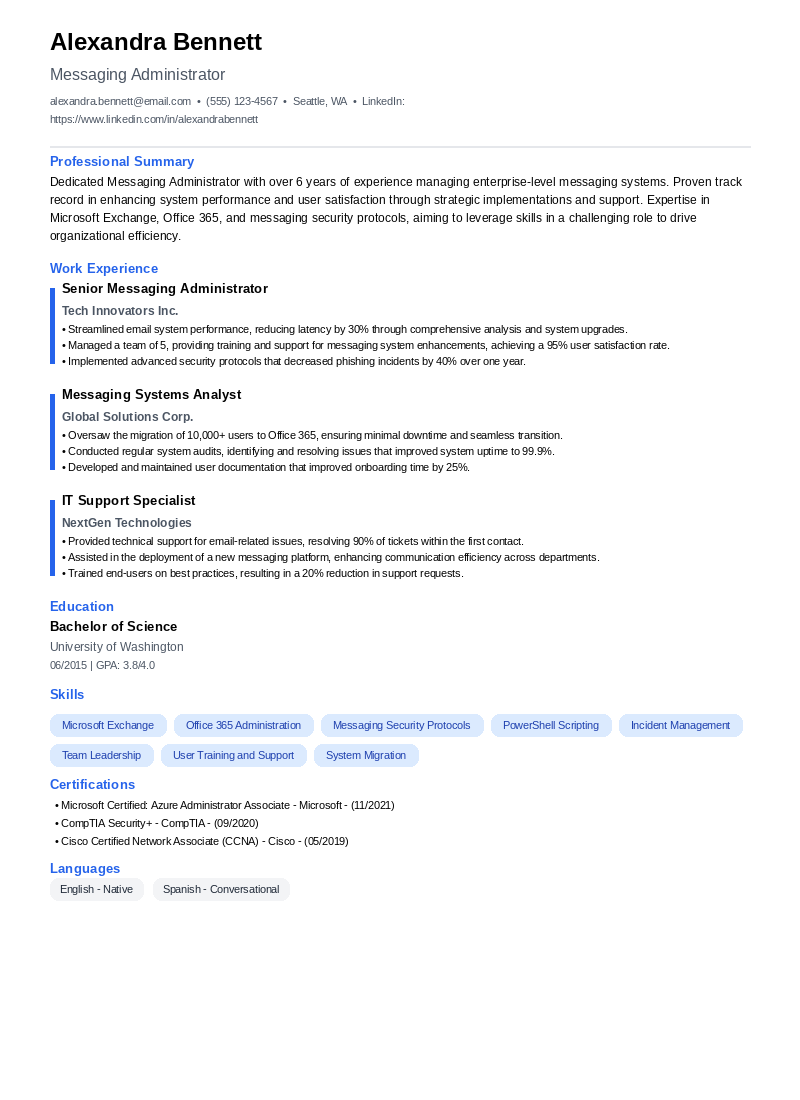
Alexandra Bennett
Messaging Administrator
Professional Summary
Dedicated Messaging Administrator with over 6 years of experience managing enterprise-level messaging systems. Proven track record in enhancing system performance and user satisfaction through strategic implementations and support. Expertise in Microsoft Exchange, Office 365, and messaging security protocols, aiming to leverage skills in a challenging role to drive organizational efficiency.
Work Experience
Senior Messaging Administrator
Tech Innovators Inc.
Seattle, WA
- Streamlined email system performance, reducing latency by 30% through comprehensive analysis and system upgrades.
- Managed a team of 5, providing training and support for messaging system enhancements, achieving a 95% user satisfaction rate.
- Implemented advanced security protocols that decreased phishing incidents by 40% over one year.
Messaging Systems Analyst
Global Solutions Corp.
Portland, OR
- Oversaw the migration of 10,000+ users to Office 365, ensuring minimal downtime and seamless transition.
- Conducted regular system audits, identifying and resolving issues that improved system uptime to 99.9%.
- Developed and maintained user documentation that improved onboarding time by 25%.
IT Support Specialist
NextGen Technologies
Tacoma, WA
- Provided technical support for email-related issues, resolving 90% of tickets within the first contact.
- Assisted in the deployment of a new messaging platform, enhancing communication efficiency across departments.
- Trained end-users on best practices, resulting in a 20% reduction in support requests.
Education
Bachelor of Science in Information Technology (GPA: 3.8/4.0)
University of Washington
Seattle, WA
Skills
Certifications
- Microsoft Certified: Azure Administrator Associate
- CompTIA Security+
- Cisco Certified Network Associate (CCNA)
Languages
Download This Resume
Messaging Administrator Cover Letter Sample
A professional cover letter example for your Messaging Administrator job application
Messaging Administrator Cover Letter
Sample Template
John Smith
November 4, 2025
Jane Doe
Hiring Manager
Tech Solutions Inc.
Austin, TX
Dear Hiring Manager,,
I am excited to apply for the Messaging Administrator position at Tech Solutions Inc. With over five years of experience managing enterprise messaging systems and a strong background in IT infrastructure, I am well-prepared to contribute to your team and ensure seamless communication across the organization.
Throughout my career, I have developed expertise in Exchange Server administration, troubleshooting, and performance optimization. My hands-on experience with cloud-based messaging solutions, combined with my ability to implement security protocols, has consistently resulted in enhanced efficiency and reduced downtime. Additionally, my certification in Microsoft 365 and familiarity with various messaging platforms equip me with the skills necessary to tackle the challenges of this role effectively.
I am particularly drawn to Tech Solutions Inc. because of its commitment to innovation and its dynamic work environment. I am eager to bring my proactive approach and problem-solving abilities to your team, contributing to the continued success of your messaging infrastructure and supporting your mission to deliver exceptional service to clients.
I would love the opportunity to discuss how my background and enthusiasm align with the goals of Tech Solutions Inc. Please feel free to contact me at your earliest convenience to schedule a conversation. Thank you for considering my application.
Sincerely,,
John Smith
Download This Cover Letter
Frequently Asked Questions
Download Templates
Give your Messaging Administrator resume a polished look with these free, professionally designed templates.


Related Resume Examples
Create Your Resume
Use our AI-powered resume builder to create a professional messaging administrator resume in minutes.
Start Building Now